
Three Years of Systems, 30 Days to a Playable Game
What this post is about: Scurvy is a seafaring crew adventure sim we’ve been building for three years. To show at the Imperfect Games Festival in July 2026 (an indie game showcase here in China), we spent one month welding our pile of half-finished systems into an Arcade mode you can actually sit down and play for 10 to 30 minutes — and that’s the build we brought to the show. It’s now free to download. This post is a postmortem of that month: the calls we made on AI-assisted development, art direction, internal tooling, and game structure, and why we made them.
The Festival
Back in late May, a post from an account called the Imperfect Games Festival came across my feed on Xiaohongshu (known in English as rednote — roughly Instagram crossed with Pinterest, and enormous in China). They had maybe a few dozen followers at the time — even today, July 22, they’re only at around 200, so if you’re a dev, go give them a follow. But the post read like it came from people with actual taste, not some slapdash operation thrown together over a weekend. So I clicked through, and found two requirements: the game may be unfinished, and it has to be playable for at least 10 minutes. My first thought was that somebody had designed this event specifically for us.
At that point we only met the first requirement — unfinished, definitely (😅). But getting to 10 playable minutes by July 18 didn’t sound like a stretch. We’d been at this on and off for three years, after all. (I’ll probably do a separate post on those three years at some point, and on how exactly it takes three years to build this much.)
So I talked it over with the other two people on the team and we signed up. The show itself was packed. The games were genuinely good, the crowd was big and enthusiastic, and our booth had someone in front of it from 11am until we tore down — a steady stream of players sitting down to try it and handing us feedback that was both generous and useful. Also, we have zero in-game tutorial, so the tutorial was me, talking, all day. By the time it was over my voice was shot and swallowing water hurt. The whole thing was better than I expected by a wide, wide margin — the organizers were practically running a charity — so thank you again, whether or not you ever read this.
The month felt like one long game jam, and it was a blast. There’s plenty from it worth sharing, but before I get into any of that, here’s what changed between the day we decided to enter and the day we showed up. The festival build is free to download and play right here, and we’d love to hear what you think.
| Area | May 30 (the day we signed up) | July 18 (show day) |
|---|---|---|
| Core systems | Already fairly solid: building, pathfinding, crew AI, enemy AI, world map, all the control logic | Another deep optimization pass on top; sturdier still |
| Combat | Core combat logic put together in a week, with only one monster type | A combat system with some polish, multiple monster types, and AI ship behavior |
| Map | Big multi-island world, 2–5 minutes of sailing between ports | Cut way down — three islands, one of which actually matters |
| Game loop | A pile of disconnected features; barely playable | Arcade mode: a complete loop that holds your interest for 10–30 minutes |
| Art | All placeholder — raw Tripo output and unvetted third-party assets | Redone and curated, a visible step up; settled on 3D buildings + 2D characters |
| Audio | None whatsoever | Rough but characterful music and sound effects |
| Content pipeline | None | Web-based world map editor + ship editor |
| UI | A genuine mess of a layout | New layout and interactions (still needs another rework, but players could get through the game with a dev talking them through it) |
What follows is an open postmortem of the key decisions from the last few months, including the run-up to the show, sorted by topic. Partly it’s to get our own thinking straight, partly it’s in case any of it is useful to other devs, and partly so players know what we’ve actually been doing.
This post has no particular audience in mind, so I’m mostly writing whatever comes to me in whatever order it comes. Skip to whichever bits you care about.
Writing Code with AI
The AI workflow video I put up on Bilibili a few months ago has picked up a few thousand likes and tens of thousands of views, and took my account from 60 followers to 2,000. Honestly, I didn’t expect that much appetite for something that plain — light on specifics, mostly just methodology — so I’ll probably keep making things like it now and then. (There’s a written version of the same workflow too.)
Since then the models have taken another step up, and my own workflow has moved along with them. Roughly how it went:
- I tried the superpowers skill collection.
- I took superpowers plus what I’d learned in practice and built my own set of skills to fit how I actually work. The important pieces:
| Stage | Skill | What it does | In → Out |
|---|---|---|---|
| Design research | /design-research |
Looks up how other games solved the same design problem (loops, mechanics, progression, economy) and returns a comparison of 2–4 reference games plus what’s worth stealing | A design problem → a comparison writeup |
| Design | /design |
Turns a one-liner, a rough draft, or a chat log into a structured game design doc | An idea → a design doc |
| Design review | /post-design-review |
Vets the design doc from the implementer’s side: internal consistency, playability, buildability, gaps against the existing codebase | Design doc → a list of problems |
| Technical planning | /plan |
Turns the design doc into a technical plan: architecture, interfaces, ordered steps with file paths | Design doc → implementation plan |
| Cross-model plan review | /codex-plan-review |
Hands the plan to Codex for a second-model review and revises it against the findings; loops on its own until nothing critical is left or it hits 5 rounds | Implementation plan → revised implementation plan |
| Implementation | /execute |
Works the plan step by step: compiles to verify as it goes, farms big chunks out to subagents, resumes from checkpoints | Revised plan → code |
| Testing | /test |
Runs Unity EditMode + PlayMode tests and fixes what breaks | Code → test results |
| Cross-model code review | /codex-code-review |
Hands uncommitted changes to Codex for a second-model review — after tests, before commit — looping until nothing critical is left or it hits 5 rounds | Code → fixed code |
| (All of these skills are up on GitHub if you want the actual contents.) |
- I tried to automate that whole chain, fell into the orchestration/harness rabbit hole for a while, and built quick-question. It didn’t do what I hoped and I dropped it — but two things survived:
- These days, anything heavy gets the full run from design research through design review. For light or fuzzy work, I talk it through with Claude until the requirement is clear, then turn it loose straight into technical planning and let implementation, testing, and review run themselves. I just come back for the result.
- I also went from one Claude Code account and one Codex account to five Claude Code Max accounts plus one Codex Pro. About 70% of that quota goes into this project; the other 30% into another project I’m working on at the same time.
A few other things I’ve picked up:
- Always reach for the smarter model (Opus 5/Fable > Sonnet), and make full use of Claude Code’s ultracode setting and workflows. Ultracode pairs
xhighreasoning effort with automatic workflow orchestration. For the same end result, redoing the work several times is far worse than one slower pass. Unless it’s adding a couple of buttons, or something I judge to be genuinely simple — under a day of writing it by hand — I’ll almost always run ultracode. Even for everyday back-and-forth with Claude Code I sit at thehigh/xhigheffort settings. Spend money on a smart agent or spend time on a dumb one: I’ll take the first every time. The second usually just leaves you more frazzled, or feeling productive (strictly a feeling), and either way it costs you more in opportunity. I’ll often have 4–6 windows open on orthogonal work. When a long task is the bottleneck and I have to wait, I go do design work or switch to my other project. - For specific tasks with a clear success criterion (one example of a criterion: every test passes both before the task starts and after it finishes), try /goal. Things like “get the frame rate in this specific scene up to 60fps” or “migrate this system to a new architecture”. Over a day and a half, with almost no intervention from me, it took the game on my machine from an average of 15fps to 80fps. I made a handful of key calls along the way; total human attention was about an hour.
- Run /insights now and then and tune your process. When you notice Claude tripping over the same thing again and again, or notice yourself typing the same correction again and again, that’s a process problem. Among other things, we’ve improved how we catch drift between docs and implementation, how we keep Claude’s memory synced and current, and how often tykit locks up.
- Use MCP, or anything else, to let the agent read Unity’s logs itself. Stop pasting logs in by hand. I use my own tykit for this, but tools like it are everywhere. Test output, runtime logs written to a file, plain debug logs — whatever it is, automate the agent’s read path. The difference this makes is not small.
Art and Audio
Rewind to 2023, when the project was just getting going. The art plan then was Prison Architect / RimWorld territory: 2D side-view characters and small props, 2D top-down buildings. The reasoning at the time:
- We figured 2D assets cost less to produce — for us and for whoever writes mods later — and less to render.
- We’d heard 2D is easier than 3D, and that a first-time dev’s first game shouldn’t be 3D.
- The style had more than enough room for our game. We do have a Z axis, which Prison Architect and RimWorld don’t, but Dwarf Fortress had already shown that a top-down view with a Z axis can work — and there’s no way our game gets more complex than Dwarf Fortress.
Then, predictably, our ambitions grew and we started wanting something with more expressive range. In order, here’s what we tried.
- 2D side-view characters, 2D side-view props, Don’t Starve-style 2D buildings and environments at a 45° angle
- Why we considered it: with top-down 2D buildings, anything stacked — same X/Y, different Z — reads terribly, whether you’re building across decks or just admiring your ship. We did sketch out a scheme where a dedicated side view sat alongside the top view and stayed in sync, but we didn’t want the game to look like CAD software. Hence the classic 45° angle.
- Why we killed it: our camera rotates freely — it isn’t locked to a handful of fixed angles the way Don’t Starve, RollerCoaster Tycoon, or RollerCoaster Tycoon 2 are, with their four snap positions. Under free rotation, flat sprites read as cardboard. I don’t want players thinking about Paper Mario in any situation. And for buildings with a non-square footprint, we couldn’t come up with a good way, quickly, to make the ground placement legible. (If you’ve solved that one, I’d love to hear about it.)
- 2D side-view characters, 2D side-view props, 3D buildings and environments
- Why we considered it: it obviously fixes the previous option’s problem for free, and the Paper Mario problem goes away.
- Why we killed it: we didn’t, actually — this is where we ended up. But the first time I thought it through, Tripo and Meshy showed up and made me think we could push further. The only reason we were using 2D assets was production cost, and AI modeling tools looked like they’d solve a good chunk of that. And on performance: if buildings and environments are already 3D, making the characters 3D too doesn’t seem to add all that much. So we started trying 3D characters.
- 3D characters, 2D side-view props, 3D buildings and environments
- Why we considered it: back in 2024 we talked through a lot of art styles. The spectrum chart below is the one we drew to map out every direction we thought the game’s look could go. Project Zomboid was a big reference — at the time I pictured our look as realistic, brutal, and unforgiving. Pushing one step further in that direction, I wanted to try a modernized PSX style: the ultra-low-poly models with pixelated textures that were everywhere in the turn-of-the-millennium 3D era, but with contemporary lighting and materials. Back then that was just one option among many. Over the next year or two (2025–2026) I kept noticing more and more indie games going that way and getting great results with it. AI modeling tools kept improving too — Tripo and its cousins really can produce PSX-style models that meet my bar now. My one worry at that point was that PSX seems welded to horror. I do want the game to feel real; I don’t want players hit with a wall of dread the moment they open it. Then Coinbase put out “Your Way Out”, which pointed the way to a PSX look that’s real without being frightening. It convinced me the style works, is still under-explored — which is to say it still feels fresh — and is something people enjoy. So I started dropping PSX models into scenes: characters, ocean, buildings.
- Why we killed it:
- 3D faces are hard to make recognizable. At the same camera distance, it’s harder for a player to tell characters apart by their faces — and for a game built on getting attached to characters, that’s fatal. With 3D characters, most of what you’re looking at is the top of someone’s head, not their face.
- With 3D characters, animation is what carries the emotion, and I currently have no idea how to do that. This was the deciding reason.
- There’s no large, stylistically consistent, reusable library of PSX-style assets out there.
- Performance. Tripo’s “low-poly” output still comes in at 5,000 polys, plainly more than a PSX model needs. Decimating them is doable, but it was never going to climb high enough on our priority list. And the game was hitting bad frame drops and hitches around then — any performance we could claw back out of the art was free money.
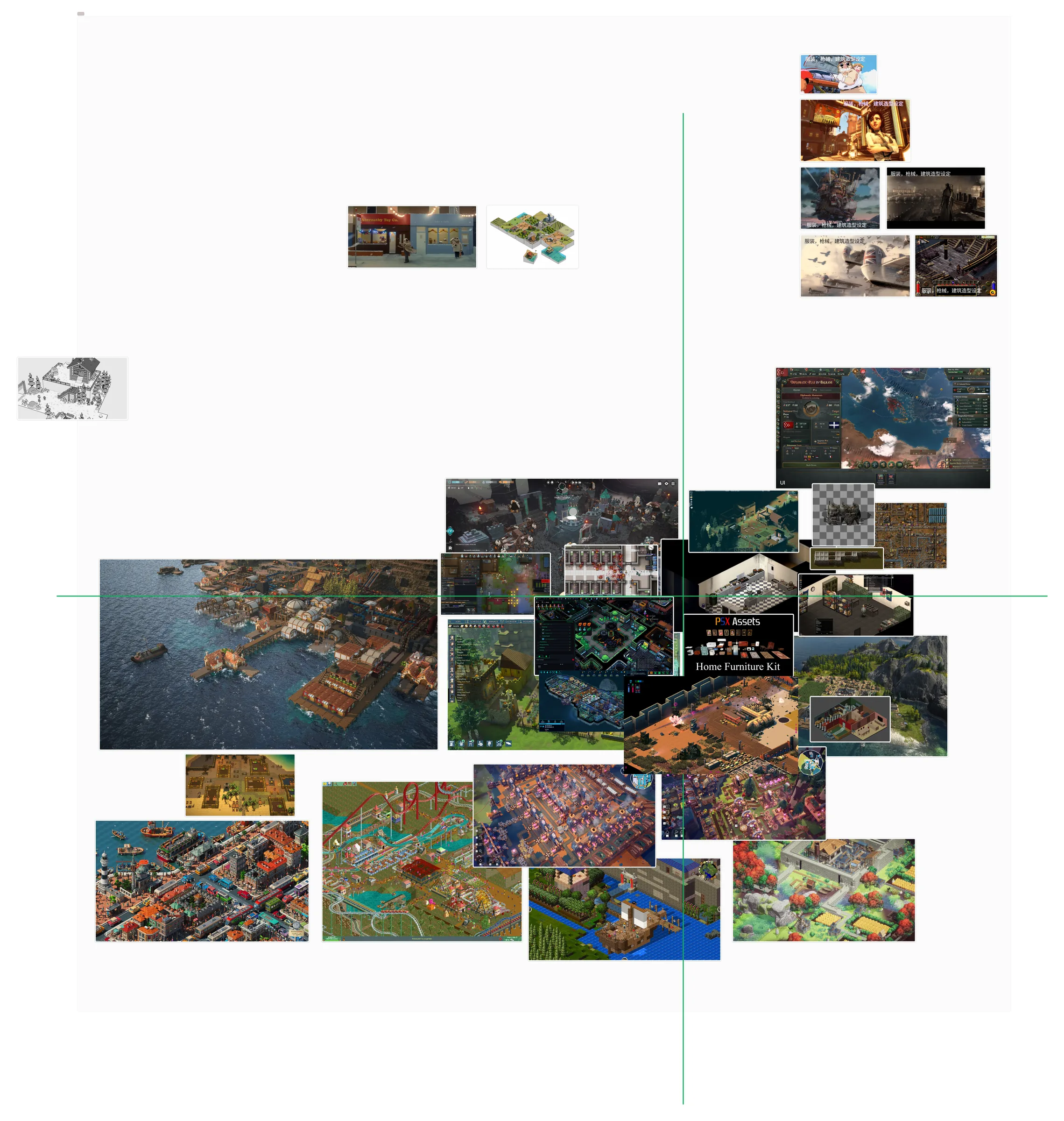
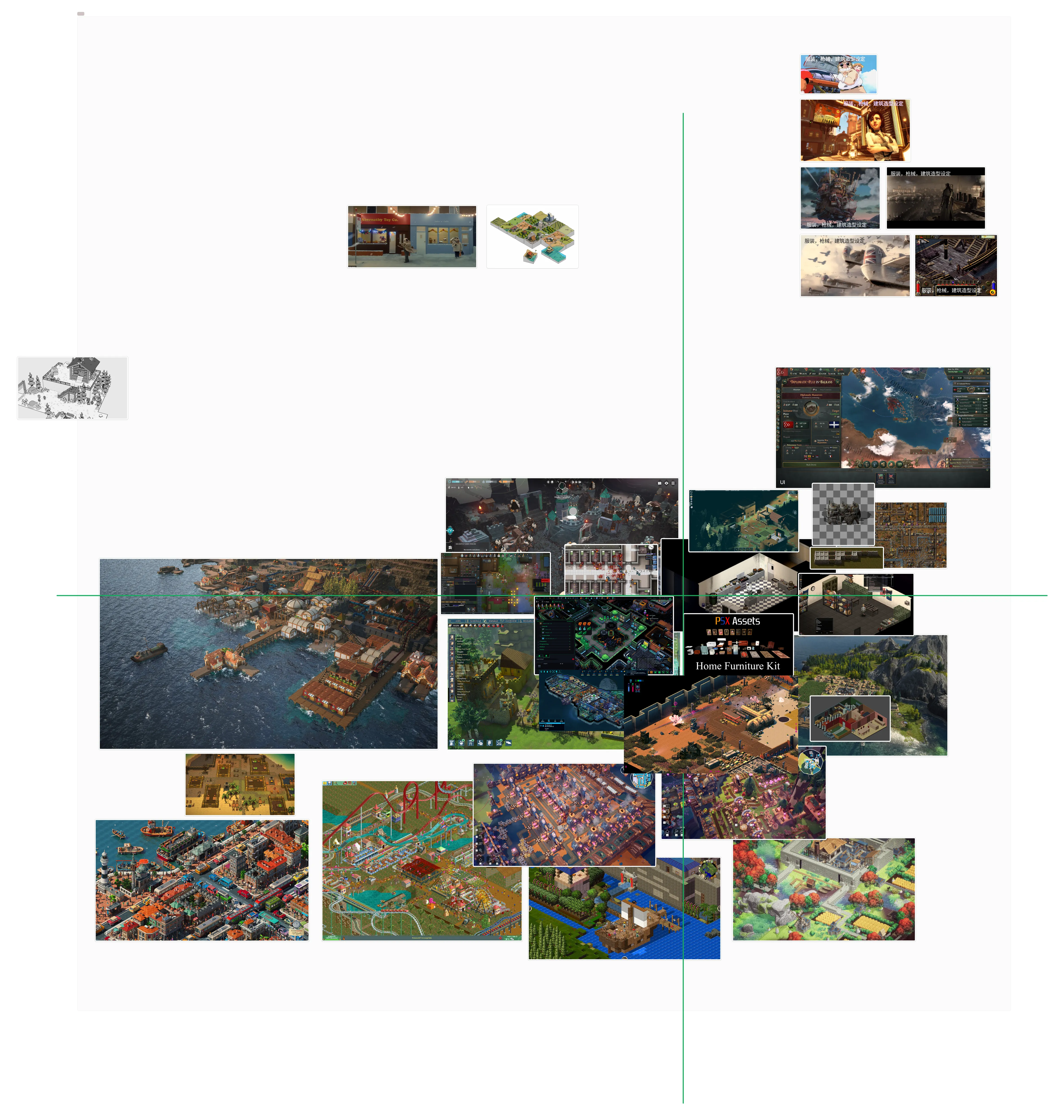
Where we’ve landed for now — the demo you can play — is 2D side-view characters, 2D side-view props, 3D environments and buildings. Broadly, why:
- Why we went back to 2D characters. We found cc2d, an off-the-shelf 2D character tool with some basic animations built in. And after all that time wrestling with 3D characters, I can reasonably say 2D costs less to produce than 3D whether or not AI is involved. With AI’s help I can make 2D assets myself (at an amateur level). Put me in front of a 3D model with the same AI help and the same hours, and I struggle to get anything I’m happy with.
- Why we’re sticking with 3D buildings. Honestly, only because every other option above is worse. Which means we’ll probably have to spend extra effort later making sure the 3D buildings sit properly alongside everything else. For a good while yet, buildings will likely stay whiteboxed.
- Terrain. We tried procedurally generating arbitrary terrain and landmasses, with an editor on top, and it turned out surprisingly well. What’s in this build is the crude first pass; later versions should be a real step up.
- The environment overall — water, lighting — is drifting toward realism. There are more assets to work with that way, and realistic light and environments against cartoon characters have a strange beauty to them. No Rest for the Wicked nails this direction, though it’s fully 3D.
The art you’re seeing in the demo took about three to five days of trying things and adjusting. Apart from the parts that came from plugins, most of the buildings are the output of Codex (GPT-5.6) driving Blender — that batch took roughly four hours. Short term, this is the road we’re staying on.
Developer Tools
Before AI coding, building a web-based editor at this stage of our project would honestly have been a luxury. AI dropped the cost of these tools through the floor. And since an AI picks up a tool instantly — no learning curve, no resistance to using it — the ROI on them is close to infinite.
Editor scripts, for example
- One-click model swap on a target prefab
- Batch-replace building models from a CSV
- Validity checks on procedurally generated ships
- An assortment of scripts for bulk-editing the components on a prefab, so an agent can fire one command instead of poking at things by hand through MCP/tykit
In-game debug tools, for example
- Element brush: set a building on fire by clicking it
- Boss test panel: spawn a boss, start the fight, skip to the next phase, one-shot it, read state live
- Scene presets: a dozen or so test setups, so the ship, monsters, and supplies are already laid out the moment you hit play
- Sea state and VFX panels: wind speed, wave height, water color, particle parameters, all on runtime sliders — when it looks right, hit “export current values” and paste them back into the code
- Performance probe hotkey: a fixed 20-second capture that tells you whether you’re CPU- or GPU-bound, then reports draw calls, GC, and a ranked breakdown of where main-thread time went
- Time skip: jump straight to day six and the final fight
Content editors
- World map editor (web, six modes): draw monster-region polygons and their spawn timelines, draw island outlines and terrain presets, place cities, set up nations and their diplomatic relations, paint tiles Europa Universalis IV-style to carve up borders, and configure what each city sells and for how much
- Ship preset editor (web): a top-down grid where you paint cells, place buildings, cut holes, and drop in crew and supplies, and out comes the ship config the game reads
- Dialogue editor (web): write the line-selection rules and the grammar word lists, with a live preview of the sample lines they expand into
On July 16 I cut the entire world down: most of the islands, cities, nations, and territory tiles gone, the spawn point and every encounter zone redrawn, three islands left standing. Without that editor, this would have been hand-editing a stack of CSVs and JSON and then booting the game over and over to check I hadn’t fat-fingered a coordinate.
What Arcade Mode Actually Is
The build available for download is Arcade mode, focused on combat and a fast pace. There’s also Career mode — more about crew management and adventure simulation — still in development.
The short version: you have seven in-game days to beat back everything that comes at you, and to score as high as you can while doing it.
As I said, before we decided to enter the show we already had a pile of half-finished systems, and I was confident we could get something passable out of them. So the original plan was a demo with combat, the world map, crew management, and trading. But apart from combat, those are all higher-level gameplay systems. And trading only works if the voyages between ports have combat, building, and management to give them substance. Of those pieces, only combat was even scraping a passing grade; none of the rest was any fun at all.
So after going back and forth, I ended up looking at the shortcut everybody uses: the roguelite/roguelike. A roguelite is a good structure because you can fit almost any kind of play, at almost any scale, into it. It gives a run a predictable, easy-to-read shape, and it gives the player a power curve they can feel.
The build we actually took to the show drifted a little away from the traditional roguelite, toward Arcade mode, with its emphasis on chasing a higher score. Mostly because I didn’t want players on the show floor dying over and over before they’d figured out the core mechanics. In later updates I’ll probably make the mode more challenging.
Career Mode: What Scurvy Wants to Be
Not much to say here yet, but I want this mode to give people a management sim that feels like something new — a mash-up of:
- Crew management
- War simulation
- Trading
- Political simulation
So if you like these games, we’re probably worth keeping an eye on:
- RimWorld
- Barotrauma
- Darkest Dungeon
- Factorio
- Crusader Kings
Building in Public
Since June, it’s felt like we’ve come out the other side of phase one of this project. We went from:
- Deep uncertainty about whether the tech and the gameplay were even feasible
- Spending most of our time validating that tech and gameplay
to: 3. The core technical architecture is now in place. New code can build on the underlying systems without much friction, and we have a reasonably clear direction for gameplay. 4. A substantial amount of foundational code is still missing, but it takes up a shrinking share of development time. More of that time now goes into building and iterating on gameplay, with an increasingly solid basis for our decisions. 5. Our workflow is taking shape, and we have a fairly clear idea of where it needs to go.
And now that we’re splitting Arcade mode and Career mode into separate development and update tracks, it feels like the right time to bring in real outside players — that’s you, reading this — to push the project forward with us. Leave us a note on the site, or join whichever community you like and talk to us directly. Your feedback can have a real and timely influence on where development goes.
Comments